
Best Computer Chashma Under ₹499, A Straight-Talk Guide for Heavy Screen Users

Somewhere around hour five on a laptop, most people stop noticing the strain. It just becomes the background noise of the day – eyes that feel heavy, a dull ache behind the forehead, blinking more than usual. By 10 PM the screen feels almost aggressive.
A lot of people chalk it up to stress or bad sleep. Some of it is. But a significant part of what’s happening is the eyes working overtime to deal with screen glare, inconsistent brightness, and blue light – the high-energy wavelength that monitors, phones, and LED lights all throw at you in large doses.
Computer glasses are built specifically for this. Not because they perform miracles, but because even filtering 30–40% of that blue light — combined with a proper anti-reflection coating – takes a real load off the eyes over the course of a day.
And no, you don’t need to spend a lot on them. Under ₹499, there are options that actually do the job.
What Makes a Computer Chashma Worth Buying ,And What Doesn’t
The frame is almost a secondary concern. What actually makes the difference in a screen chashma is what’s on the lens.
The Lens Is Everything
Most people shopping for computer glasses spend all their time picking a frame style and barely read the lens description. That’s backwards. A beautiful frame with a bad lens does nothing for your eyes.
Here’s what a computer lens worth buying should have:
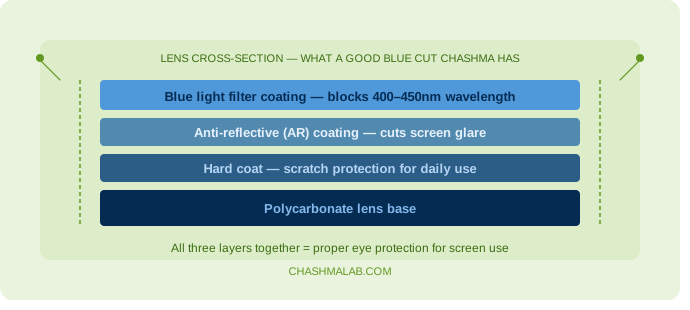
Blue cut coating – This is the main thing. It filters the 400–450 nm blue light range, which is the portion most associated with eye fatigue and sleep disruption. Some cheap listings just have a yellow-tinted lens to make everything look warmer — that’s not the same thing. Look for product descriptions that specifically mention “blue light filter” or “blue cut lens” with a coating, not just a tint.
Anti-reflective (AR) coating – Reduces the reflection you see on the lens surface from tube lights, windows, and screen glare. Without this, your lens becomes a mini mirror bouncing light right back at you.
Scratch-resistant hard coat – Not glamorous, but practical. A lens without hardcoat scratches within two months of daily use. Look for this mentioned in the product specs.
If a pair of glasses under ₹499 has all three, you’re getting genuinely solid value. Many listings at ChashmaLab in this range do exactly that.
Frame Material Is About Comfort Over Hours
You’ll be wearing this for 6, 8, maybe 10 hours some days. That changes the priority.
TR90 is the best material for this use. It’s a thermoplastic that’s extremely light (some frames under 20g), flexible enough that it won’t snap if bent, and comfortable enough that you forget you’re wearing it. This is what you want for long screen sessions.
Acetate is slightly heavier but has a premium feel. Good if weight isn’t a concern.
Standard plastic or “PC frame” – Fine, but watch out for frames described only as “plastic” with no further detail. These tend to become brittle in 8–12 months and can warp slightly in heat, which changes the fit.
Metal frames – Look sharp, but the nose pads can dig in after a few hours. Not ideal for daily extended wear unless the nose pads are rubberized and adjustable.
Picking the Right Frame Shape for Your Face
This is where most online eyewear purchases go wrong. People pick what looks good in the product photo and then it arrives and it just doesn’t look right on their face. The frames aren’t wrong – the shape combination is.
Here’s a simple approach:
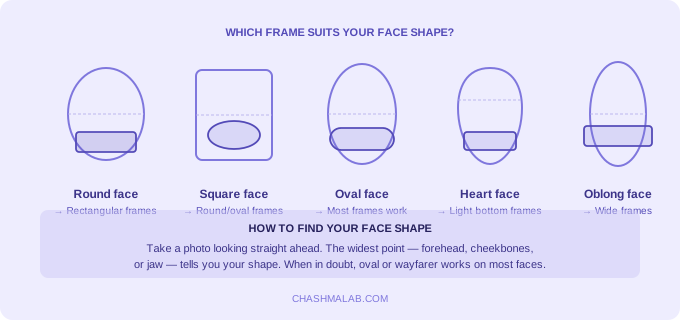
| Face Shape | What to Go With | What to Avoid |
|---|---|---|
| Round | Angular, rectangular, or square frames. They add definition | Round or oval – they amplify the roundness |
| Square | Rounded corners, oval, or circular frames. Softens the jaw | Very square or sharp angular frames |
| Oval | Most shapes work – oval faces have balanced proportions | Extremely oversized frames that dwarf the face |
| Heart / Wide Forehead | Light frames, bottom-heavy designs, rimless or semi-rimless | Heavy top-bar frames or very wide frames |
| Oblong / Long | Wide frames, prominent top bar. Adds horizontal balance | Narrow frames that elongate the face further |
Quick way to figure out your face shape: take a photo looking straight ahead, or trace your face outline on a mirror with a dry-erase marker. The widest point — forehead, cheekbones, or jaw – usually tells you what category you fall into.
Frame Sizing: This Part People Skip and Regret
When a frame doesn’t fit, people think the chashma is bad. Usually the size is just wrong.
Three numbers matter:
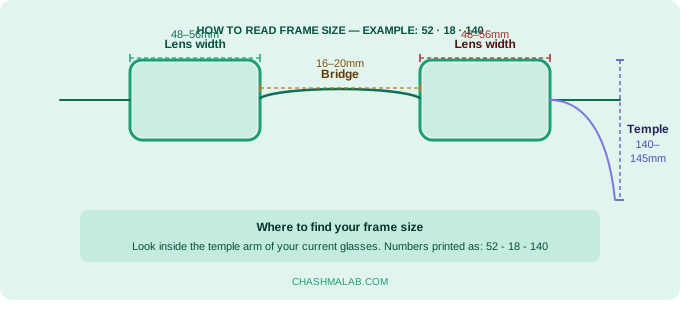
Lens width – The horizontal width of each individual lens, in mm. Most adult frames fall between 48mm and 56mm. If you have a narrower face, go 48–50mm. Broader face, 52–56mm.
Bridge width – The gap between the lenses that sits on your nose bridge. Usually 16–20mm. If your current glasses slip down constantly, you might need a wider bridge. If they pinch, you need narrower.
Temple length – The arms that go behind your ears. 140–145mm fits most adults. Too long and they’ll slip; too short and they’ll press into your temples.
If you already own a pair of glasses that fits well, just look at the numbers printed on the inside of one temple arm. They’re usually written as something like: 52-18-140. That’s lens width, bridge, temple length. Match this when ordering.
What to Expect in Different Styles Under ₹499
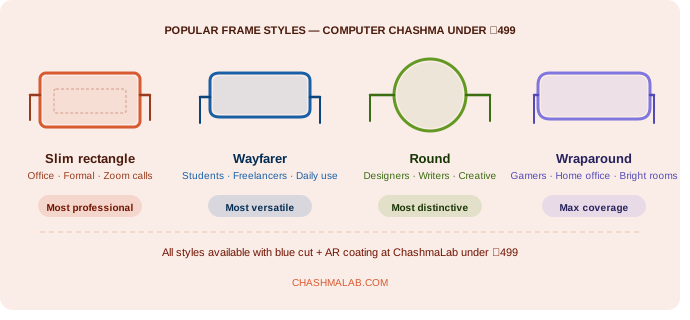
Slim Rectangular Frames
The most practical choice for people in professional settings — office jobs, client calls, formal presentations. They look clean, sit close to the face, and work with both formal and smart-casual outfits. Most slim rectangles in TR90 at this price point are surprisingly well-built.
Best for: Office workers, CA/law/medical professionals, anyone on Zoom regularly.
Classic Wayfarer Shape
One of the most face-shape-friendly designs ever made. The wayfarer has a slightly wider top bar and a gentle taper — this works on round faces, oval faces, and square faces almost equally well. At under ₹499 you’ll find decent blue cut wayfarer options that double up for daily casual use.
Best for: Students, freelancers, people who want one chashma for screen work and general wear.
Round Frames
These have a strong following among creative professionals and people in design, content, or academics. A round frame changes the energy of a look quite a bit — in a good way, if it suits your face shape. With a good blue cut lens they’re a valid choice, not just a style flex.
Best for: Designers, writers, artists, academics, anyone who wants a distinct look.
Full-Rim vs Half-Rim vs Rimless
Full-rim – Most durable, protects the lens edge, most style variety. Good default choice.
Half-rim (semi-rimless) – Lighter, less visible on the face. Slightly less durable since the bottom of the lens is held by a thin nylon thread. Fine for careful users.
Rimless – Minimalist look. Drilled lenses, very light. More fragile; not the best choice if you’re rough with your glasses.
For computer use specifically, full-rim or half-rim is usually the smarter pick.
Mistakes That Are Easy to Make When Buying Screen Glasses Online
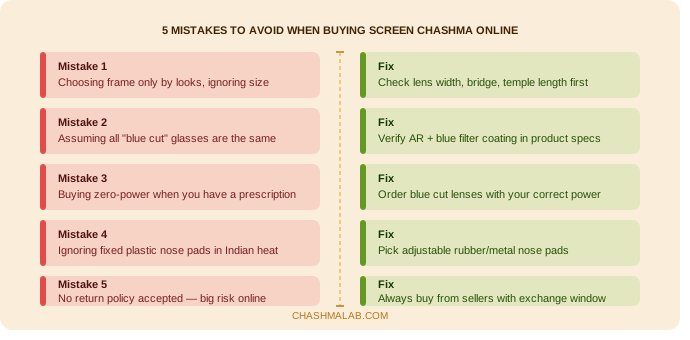
Buying purely on looks. Product photos are taken in ideal lighting with carefully chosen angles. The frame that looks edgy on the model may sit completely differently on your face. Always cross-check face shape compatibility and the frame size numbers.
Assuming all blue cut glasses are equal. A lens that just has a yellow tint reduces brightness but doesn’t specifically filter blue light wavelengths the way a proper blue cut coating does. The word “blue cut” in the product title means nothing if the description doesn’t back it up with lens specs.
Ordering without checking return policy. Fit is personal. Even if you get the sizing right, sometimes a frame just doesn’t sit well on your specific nose bridge or ear position. A seller with no return policy on eyewear is a red flag. ChashmaLab has a return/exchange window – use it without hesitation if the fit is off.
Getting zero-power glasses when you have a prescription. If you have even a mild number – say -0.5 or +0.75 – wearing zero-power glasses for extended screen work forces your eyes to overcompensate. You’ll feel more strain, not less. Get blue cut lenses with your correct prescription.
Ignoring the nose pad design. In Indian weather – especially summer — a fixed plastic nose pad on an oily nose bridge means your chashma is slipping every 20 minutes. Look for adjustable metal nose pads or anti-slip rubber pads if this is a concern.
Zero Power vs Power Glasses: Which One Do You Need?
Simple answer:
- No vision correction needed + long screen time → Zero power blue cut chashma
- Existing prescription + long screen time → Blue cut lenses with your power
- Not sure if you have a number → Get your eyes checked first. A basic eye test takes 15 minutes and costs very little. Knowing your prescription before buying online saves you from buying the wrong thing.
One more thing: if your only glasses are sunglasses or distance glasses that you take off indoors, a zero-power blue cut chashma is perfect as a dedicated screen pair.
Lens Colour: Clear, Light Yellow, or Tinted?
Clear blue cut lenses – Most versatile. No colour shift in your environment. Better for video calls where you don’t want to look like you’re wearing tinted glasses. The filtering happens at the coating level, not visible to the eye.
Light yellow tint – Slightly warmer view of everything. Some people find this soothing for long sessions. Not ideal for colour-accurate work (graphic design, photo editing) because it shifts whites and neutrals slightly warm.
Amber or darker tints – These are more for gaming or dim-light sessions. Good if your room has very harsh lighting. Not office-appropriate.
For most people – especially those working in standard lit offices or doing regular tasks – clear blue cut is the right call.
FAQ
My eyes feel fine right now. Do I still need computer glasses?
Eye strain is cumulative. A lot of people only notice the problem after months of heavy screen use when symptoms become chronic — persistent dryness, frequent headaches, blurred vision at the end of the day. Prevention is easier than correction. If you’re on screens more than 4 hours daily, it’s worth starting now.
Can I use these for driving or outdoor use?
Blue cut glasses with clear lenses can technically be worn outdoors, but they’re not designed for sun protection. For outdoor use, you want UV-blocking sunglasses. Don’t use a tinted blue cut lens for driving — it can distort how you perceive traffic lights.
How do I clean the lens without scratching it?
Use the microfiber cloth. Always. Never use shirt fabric, tissue, or paper towel — these have fibres coarse enough to leave micro-scratches on AR-coated lenses over time. Rinse under water before wiping if there’s dust or grit.
Will a ₹499 computer chashma last long enough to be worth it?
With normal use and basic care — using the case when not wearing, not leaving it on tables face-down, not sitting on it — a well-built TR90 frame with proper lenses should last 12–18 months easily. At ₹499, that’s less than ₹50 per month for daily eye protection. The math is straightforward.
Do children need computer glasses too?
Yes, especially now that online classes and educational apps mean children are on screens for 3–5 hours a day. Children’s eyes are still developing and are more sensitive to blue light. Look specifically for kids’ frame sizes — an adult frame won’t sit correctly on a smaller face and defeats the purpose.
How do I know if the blue cut coating is real and not just a claim?
Hold the lens up to a white light source and look at the reflection on the lens surface. A genuine blue cut lens will show a slight blue or blue-green reflective sheen — that’s the coating reflecting the very blue light it’s filtering. No sheen usually means no coating.
So What Should You Actually Buy?
There’s no single “best” computer chashma for everyone because face shape, prescription, work environment, and personal style all play a role. But if you’re looking for a starting point:
- Want something minimal and professional → slim rectangle in TR90, clear blue cut lens, full-rim
- Want something stylish for daily wear → wayfarer shape, clear or light yellow lens
- Want something lightweight above everything → look for frames under 20g, TR90 or titanium-blended
- Have a power number → don’t compromise on this; get your correct prescription with blue cut
Browse the ChashmaLab range under ₹499, filter by face shape if you’re unsure, and use the size guide before ordering. If the fit isn’t perfect, exchange it. That’s what the policy is there for.
Your eyes are going to spend a lot of hours on screens regardless. Might as well give them a bit of help.
Explore ChashmaLab’s full range of computer glasses and blue cut eyewear – starting under ₹499, shipped across India.
If you need eyeglasses beyond the ₹499 range — say, prescription frames with premium coatings or designer styles — Lenstick covers that space well with a wide variety of frames for every budget.